Suppose you’re on a game show, and you’re given the choice of three doors: Behind one door is a car; behind the others, goats. You pick a door, say No. 1, and the host, who knows what’s behind the doors, opens another door, say No. 3, which has a goat. He then says to you, “Do you want to pick door No. 2?” Is it to your advantage to switch your choice? (taken from Wikipedia)
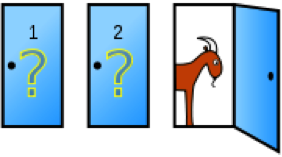
Shall I change doors or stick to my original choice? That is the question! Let’s write an R Script to run a simulation for this problem…
# Monty Hall problem simulationprint("Monty Hall problem simulation")
print("-----------------------------")
# define variableswin.switch.count <- 0
win.noswitch.count <- 0
sim.count <- 50000
switch.count <- 0
noswitch.count <- 0
print(paste("Running", sim.count, "simulations"))
# run simulation for x timesfor (i in 1:sim.count) {
# create doors, a vector 1 to 3, for door 1, door 2, and door 3doors <- c(1, 2, 3)
# set price behind a random doorprice.door <- sample(1:3, 1)
# the guest picks up a random doorguest.door <- sample(1:3, 1)
# monty needs to open a door where there is a goat# monty door is not price and is not guestdoors[price.door] <- 0
doors[guest.door] <- 0
# monty choose the max() door from the resultant vectormonty.door <- max(doors)
# re-insert the price door back in list!!doors[price.door] <- price.door
# pick a number from 1 to 10 and if it is 5 or less, guest will switch doorif (sample(1:10, 1) < 6) {
# guest switch choicedoors[monty.door] <- 0
# since we are neutralising the vector and leaving only the only door not# chosen by the guest or monty# the sum of doors will be the door leftguest.door <- sum(doors)
switch.count <- switch.count + 1
if (price.door == guest.door) {
win.switch.count <- win.switch.count + 1
}} else {
# no switchnoswitch.count <- noswitch.count + 1
if (price.door == guest.door) {
win.noswitch.count <- win.noswitch.count + 1
}}}# display outputprobability.switch <- win.switch.count / switch.count
probability.noswitch <- win.noswitch.count / noswitch.count
print(paste("P(switch door) =", probability.switch))
print(paste("P(no switch) =", probability.noswitch))
print(paste("Check P(switch) + P(no switch) =", probability.switch + probability.noswitch))
Answer:
Running the script returns something similar to:
[1] "Monty Hall problem simulation"
[1] "-----------------------------"
[1] "Running 50000 simulations"
[1] "P(switch door) = 0.671743823458863"
[1] "P(no switch) = 0.332786360361803"
[1] "Check P(switch) + P(no switch) = 1.00453018382067"
>
Switching increase the chance to win!
For a mathematical explanation we suggest to watch Numberphile’s video at https://www.youtube.com/watch?v=4Lb-6rxZxx0.